Every Brokerage or Agency team has one owner. Everyone else joins as an admin or a member. A person's role comes from the invite they accepted.
Who can do what
Owner (the account that runs the team)
- Sees Team in the left menu.
- Invites members and admins, and sees every team invite, including ones admins sent.
- Copies or revokes pending invites.
- Removes members and asks them to verify a license.
- Posts to the Team Referral Queue and uses Assign to me.
- Sees the Team leaderboard on Insights and, on paid team plans, Team Reports.
- Sets each admin's Admin permissions in Team settings.
- Manages the team's plan on Plan & billing.
Admin (Brokerage admin or Agency admin)
- Invites new teammates, as members only, from Invite an agent (or Invite a producer) on Team. The invite shows the admin's first name.
- Claims and posts queue referrals like a member.
- On paid team plans, can also set lines of business and routing rules, reassign queue referrals, see the whole pipeline, and open Team Reports, unless the owner turns one of these off.
- Sees the Team leaderboard on Insights.
Member (Agent or Producer)
- Sees Team Referral Queue in the left menu, or Queue in a phone's bottom bar.
- Claims, works and posts queue referrals, and can assign one to a teammate.
- Keeps their own Trusted Partners and referrals.
- Cannot invite. Team in the left menu (or Settings, then Your team on a phone) shows Team management is handled by your team owner.
Steps: set admin permissions (owner)
- Open Team in the left menu.
- Scroll down to Team settings, then Admin permissions.
- Find the admin. Turn each switch on or off: Can invite, Can assign and route, Can see the whole pipeline, Can see reports, Can run the team line.
- Changes save right away.
Only the owner can change these. New admins start with every switch on.
Steps: remove a team member (owner)
- Open Team in the left menu.
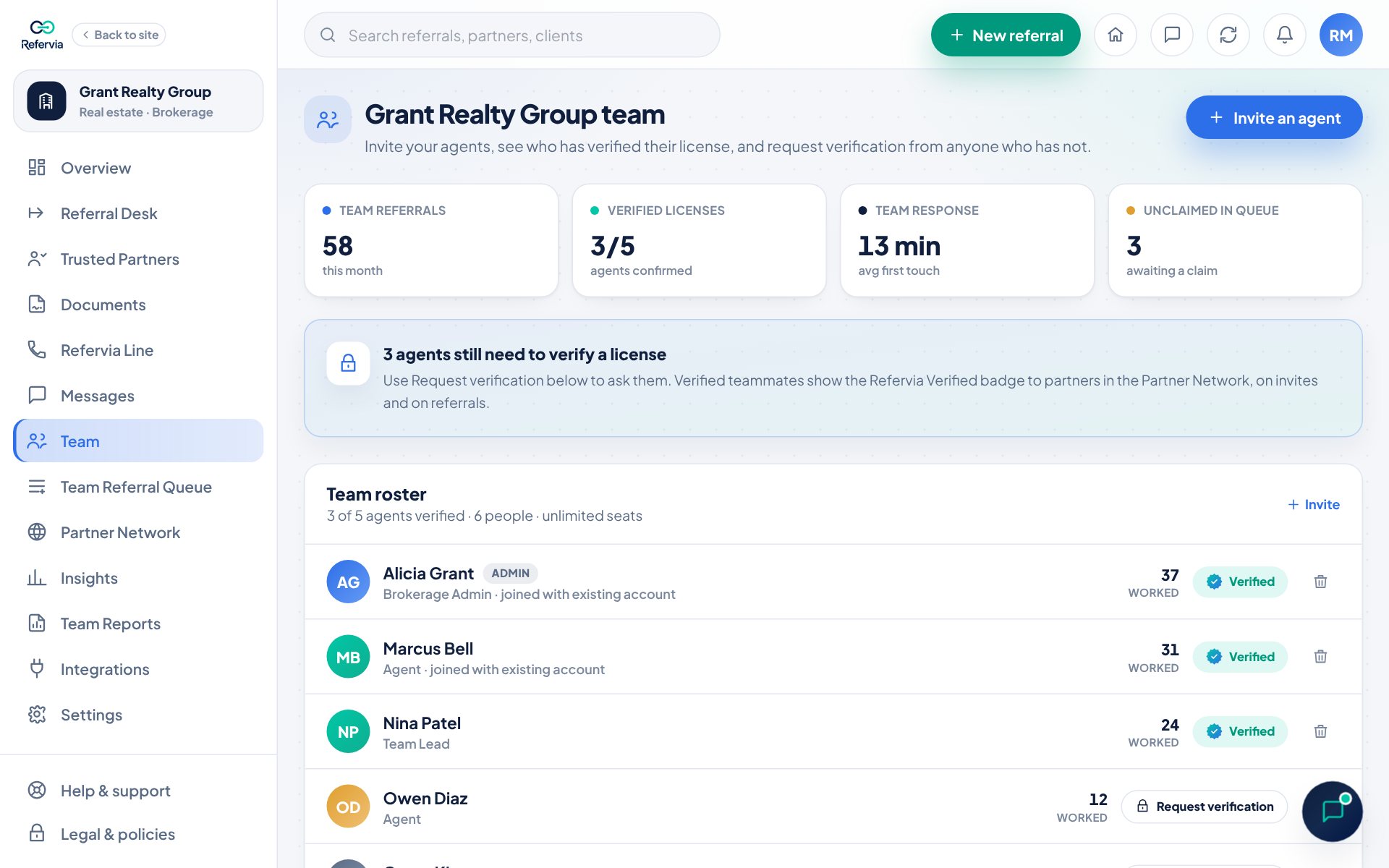
- Find the person on the roster.
- Click the trash can on the right of their row.
- Click Remove to confirm, or Cancel.
Any queue referrals they had claimed are released so a teammate can pick them up.
Steps: request license verification (owner)
- Open Team.
- Find a person without the Verified badge.
- Click Request verification. It changes to Request sent, and they get an in-app notification.
Good to know
- The roster shows each person's license status: Verified, Pending review, or a Request verification button.
- Invite pending and Awaiting join mean the person has not accepted yet.
- When an admin's invitee joins, the owner gets a notification naming who invited them.
Trouble?
- "I can't pick an admin role": Only the owner can invite admins.
- "The invite page sends me back to the dashboard": Members cannot invite. Ask your owner or an admin.
- "Could not remove (name). Please try again.": Try again. If it keeps failing, contact support.
Was this helpful?