Every plan lets you send a set number of referrals each month. Referrals you receive are never capped on any plan. Use this when you need more room, want team tools, or want a smaller plan. Where a guide says Pro and up, it means Pro, Pro Max, and every member on Brokerage, Agency and Enterprise.
What every plan includes
Every plan, Free, Brokerage Free and Agency Free included, has:
- Handoff checks before every send: the referral-fee rules for each handoff, with their sources, and your client's OK. See Handoff checks.
- Partner agreement, signed in the app: it starts on its own when you connect with a partner. See Partner agreement.
- Year in Referrals recap: your year on one page, to share from December 1. See Year in Referrals.
- Referral drafts: save a referral and send it later. See Referral drafts.
- Signing documents your partners send you, free. See Send your own documents to sign.
- Importing your current referrals from a spreadsheet (CSV). How many depends on the plan, below. See Import your current referrals.
- The Partner Network, license verification and the Verified badge, private partner labels and notes, follow-up dates with in-app reminders, and CSV export and CRM connections.
The plans
Individual plans (1 user):
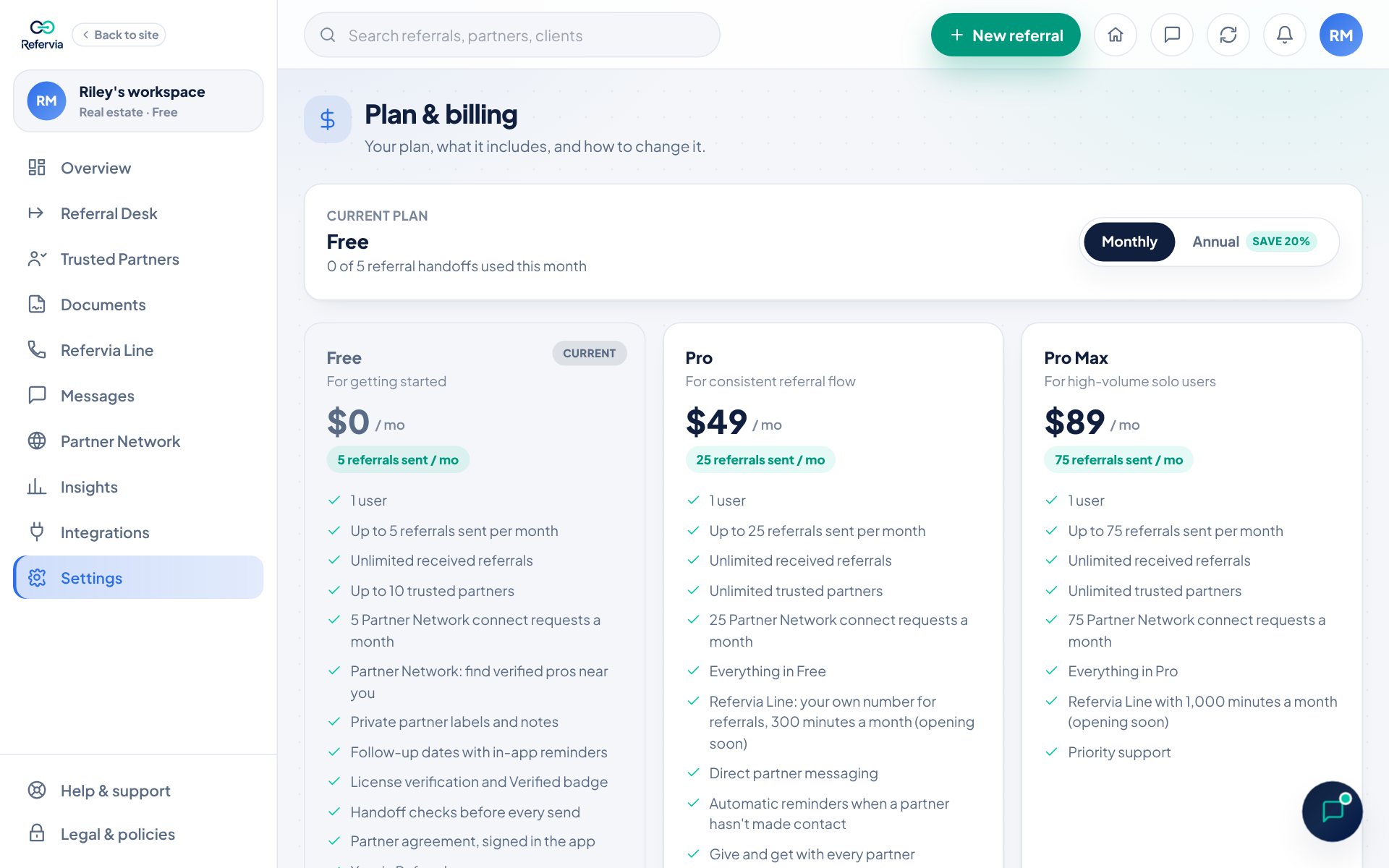
- Free: $0. Up to 5 referrals sent a month, up to 10 Trusted Partners, 5 Partner Network requests to connect a month, and Import up to 50 current referrals. Everything every plan includes, above. No messaging.
- Pro: $49/mo. Up to 25 referrals sent a month, unlimited partners, 25 Partner Network requests a month, and Import up to 250 current referrals. Everything in Free, plus:
- Automatic reminders when a partner hasn't made contact (how they work)
- Give and get with every partner (how it works)
- Client status link to share with your client (how it works)
- Send your own documents to sign (how it works)
- Direct partner messaging, automatic Partner Quality Signals and a branded referral link
- The Refervia Line, your own number for referrals with 300 minutes a month (see Your Refervia Line)
- Pro Max: $89/mo. Up to 75 referrals sent a month, 75 Partner Network requests a month, and Import up to 750 current referrals. Everything in Pro, plus priority support and 1,000 Refervia Line minutes a month.
Team plans (real estate sees Brokerage, insurance sees Agency):
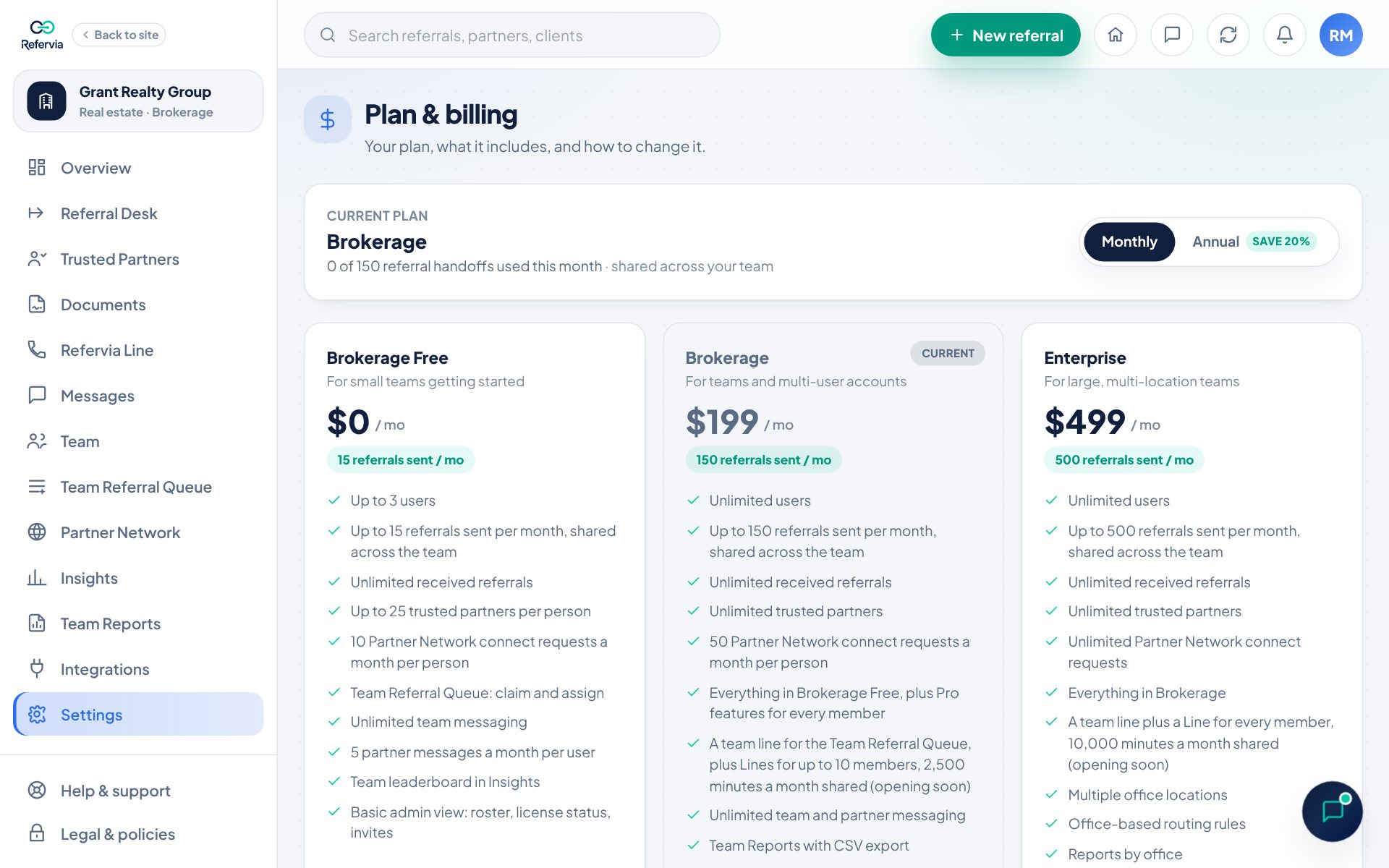
- Brokerage Free or Agency Free: $0. Up to 3 users, 15 referrals a month shared across the team, the Team Referral Queue, team messaging plus 5 partner messages per person a month, the team leaderboard, 25 partners per person, 10 Partner Network requests per person a month, and Import up to 150 current referrals, shared across the team. Everything every plan includes, above.
- Brokerage or Agency: $199/mo. Unlimited users, 150 referrals a month shared, 50 Partner Network requests per person a month, and Import up to 1,500 current referrals, shared across the team. Adds Team Reports and report emails, auto assign by line of business, shared team partner notes, admin permissions, priority support, and Pro features for every member: automatic reminders, give and get, the client status link, sending your own documents to sign, partner messaging, Partner Quality Signals and a branded referral link. It also has a team line that posts what partners leave on it to the Team Referral Queue, and Refervia Lines for up to 10 members, all sharing 2,500 minutes a month.
- Enterprise: $499/mo. 500 referrals a month shared, unlimited Partner Network requests, and Import up to 5,000 current referrals, shared across the team. Everything in Brokerage or Agency, plus a Refervia Line for every member (10,000 minutes a month, shared with the team line), multiple office locations, routing by office, reports by office, and dedicated onboarding.
Paying yearly is 20% off any paid plan. There are no per-referral fees, and received referrals are never capped.
Steps
- Open Settings in the left menu. On a phone, tap Settings in the bottom bar.
- Click the Plan & billing card at the top.
- Check the top box. It shows your Current plan and how many referral handoffs you used this month.
- On Free, Brokerage Free or Agency Free, pick Monthly or Annual (on a phone, it's inside each paid plan card) and click Upgrade to and the plan name. Checkout opens; follow the steps there. A switch to another free plan (Switch to and the plan name) lists what pauses: click Confirm switch to the plan, or Keep my current plan.
- On a paid plan, click Open billing portal. That's where you change or cancel your plan, update your card and download invoices. Upgrades start right away; downgrades and cancellations take effect at the end of the period you've paid for.
Good to know
- On Free, scroll down to Upgrade to a team account to see the team plans. On a paid plan, change plans in the billing portal.
- On Brokerage Free or Agency Free, owners can click Switch to an individual account under Prefer a single-user account?.
- Moving from a team plan to an individual plan pauses the Team Referral Queue, roster and team reporting. Your Team Members keep their own accounts.
- Your referrals, partners and history are kept on every plan change.
- Monthly limits reset on the 1st of each month.
Trouble?
- "I don't see any plan cards": On a paid plan, click Open billing portal to change plans. If you're a Team Member, your team owner manages the plan.
- "We couldn't update your plan": Try again. If it keeps failing, open a support ticket with the Billing & payments category.
Was this helpful?